



Texas pay stub generator — practical guide
If you’re generating a pay stub in Texas, you usually care about two things: it needs to read like a normal payroll document, and the totals need to make sense at a glance.
In Houston, Dallas, Austin, the most common requests we see are for rentals, loans, and job onboarding.
How to make it look real and readable
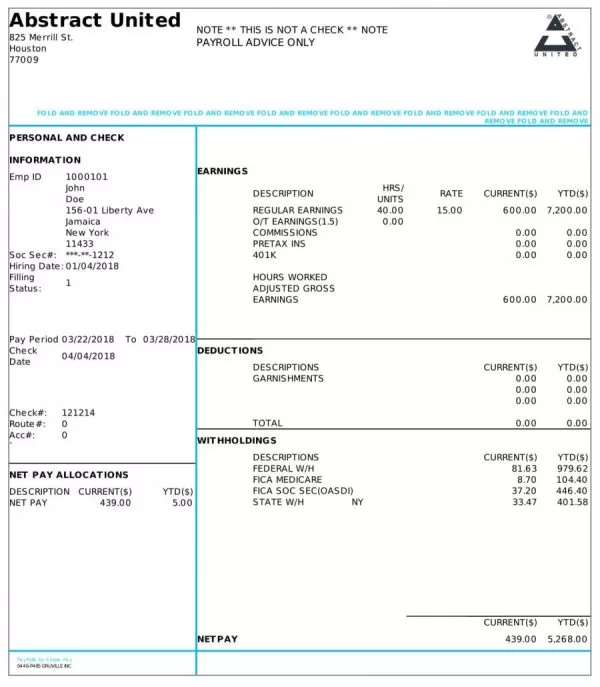
Dates are the #1 place reviewers catch inconsistencies. Make sure pay period start/end and the pay date match your pay schedule (weekly, biweekly, semi‑monthly, monthly).
Keep earnings broken out in a way a human would expect: regular wages first, then overtime, bonus, tips, or reimbursements as separate lines.
Quick checklist before you download
- If you have commissions or tips, separate those earnings so net pay makes sense quickly.
- Keep employer/employee info consistent across stubs — it prevents “is this the same job?” questions.
- If you create consecutive stubs, double-check pay dates and YTD after each save.
Next: open the generator for a free preview, or review state-by-state requirements if you have a strict checklist. Pricing is here: pricing.
Reminder: always use truthful, accurate information and follow any requestor’s checklist.
Texas pay stub FAQ
Do I need an account to preview?
No. You can preview first. Create an account if you want to save drafts or manage multiple stubs more easily.
What do most people check first?
Pay dates/periods, gross vs net, and that deductions are labeled clearly. If you’re hourly, hours × rate should line up with gross pay.
Can I generate multiple pay periods?
Yes. Keep the employer/employee info stable, then update only the dates and the numbers for each period so the set looks consistent.
Do I need to match a specific format?
If a lender/landlord/employer gave you a checklist, follow it. Otherwise, aim for readability: clear labels, consistent dates, and clean totals.